Someone types --partitions 3 because it was in the tutorial, and three years later that number is still there, quietly deciding how fast the system can go and how many consumers can do useful work. Partition count is one of those decisions that looks like a flag and behaves like a schema.
It is worth getting right for one reason above all others: you can add partitions, but you cannot take them away, and adding them changes which partition each key lands in. So the cost of picking too few is a migration, and the cost of picking too many is paid every day in broker memory and failover time.
At Acefone, Interaction Hub runs on NestJS microservices with Kafka carrying the interaction events: calls, WhatsApp messages, presence changes, agent actions. The lesson I would pass on from that system is about the events themselves, and it applies here too. Put the interaction event schema under contract tests on day one, because the key you partition by is part of that schema, and changing it later is the same size of problem as changing the partition count.
The formula, and the two numbers you have to measure
Confluent's guidance is refreshingly concrete: "you need to have at least max(t/p, t/c) partitions", where t is target throughput, p is producer throughput on a single partition and c is consumer throughput on a single partition.
The formula is easy. The inputs are the work. Two of them are measurements, not guesses:
- p, the producer side, is usually generous. Confluent notes a single partition can take "10s of MB/sec" from producers, so unless you are pushing serious volume, producers rarely decide the number.
- c, the consumer side, is almost always smaller, because the consumer does real work per message: a database write, an API call, a model inference. This is the number to measure on your own code, with your own payloads, at your own p99 rather than your average.
Get c wrong and everything else is decoration. If a consumer instance can chew through 5 MB/s and you assumed 20, you will build a topic with a quarter of the partitions it needs and discover it as lag that never drains.
The fourth number: how many consumers you want busy
Here is the constraint the formula does not mention. Kafka's design documentation puts it plainly: a topic is "divided into a set of totally ordered partitions, each of which is consumed by exactly one consumer within each subscribing consumer group at any given time".
One consumer per partition, per group. So if you run twelve consumer instances against eight partitions, four of them sit there doing nothing at all, no matter how far behind the topic is. Scaling out a consumer group past the partition count does nothing. Autoscaling a consumer deployment past the partition count does nothing but cost money.
That makes partition count a ceiling on consumer parallelism, and it is why the practical rule is: take max(t/p, t/c), then take the maximum of that and the number of consumer instances you ever want working at once.
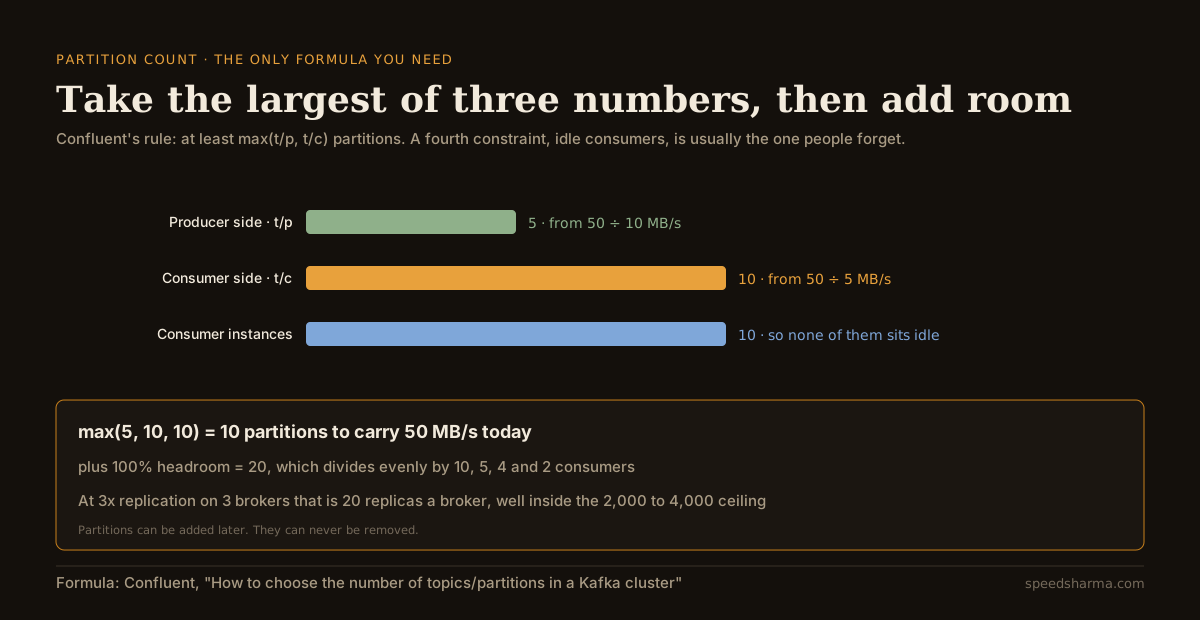
The worked example: a topic that must carry 50 MB/s at peak, where one partition takes 10 MB/s from producers and one consumer instance handles 5 MB/s. That is 5 partitions for the producers, 10 for the consumers, and 10 to keep ten consumer instances busy. The answer is 10 today, and 20 with a doubling of headroom, which happens to divide evenly by 10, 5, 4 and 2 consumers.
Work out your own number
Change the consumer throughput first. It is the input that moves the answer most, and the one most often assumed rather than measured.
calculator · partitions for one topic
How many partitions does this topic need?
what each constraint asks for, partitions
The formula is Confluent's: at least max(t/p, t/c) partitions, where t is target throughput and p and c are the throughput of one partition on the producer and consumer side. Per-broker guidance is also Confluent's: 2,000 to 4,000 partitions per broker as a resilience ceiling, and 100 × brokers × replication factor if you care about latency. Kafka cannot reduce a topic's partition count.
The tool rounds up to a number that divides evenly by common consumer counts, because uneven assignment means one instance holds an extra partition, and the busiest instance is the one that sets your lag.
Why the number is close to permanent
Two facts from the Apache Kafka documentation do most of the work in this decision.
The first: "Kafka does not currently support reducing the number of partitions for a topic". If you pick 500 because it felt safe, you own 500 until you create a new topic and migrate every producer and consumer to it.
The second is subtler and hurts more. Adding partitions is a one-line command, but the docs warn: "one use case for partitions is to semantically partition data, and adding partitions doesn't change the partitioning of existing data so this may disturb consumers if they rely on that partition". If your partitioner does hash(key) % number_of_partitions, changing the count changes the answer for most keys, and "Kafka will not attempt to automatically redistribute data in any way".
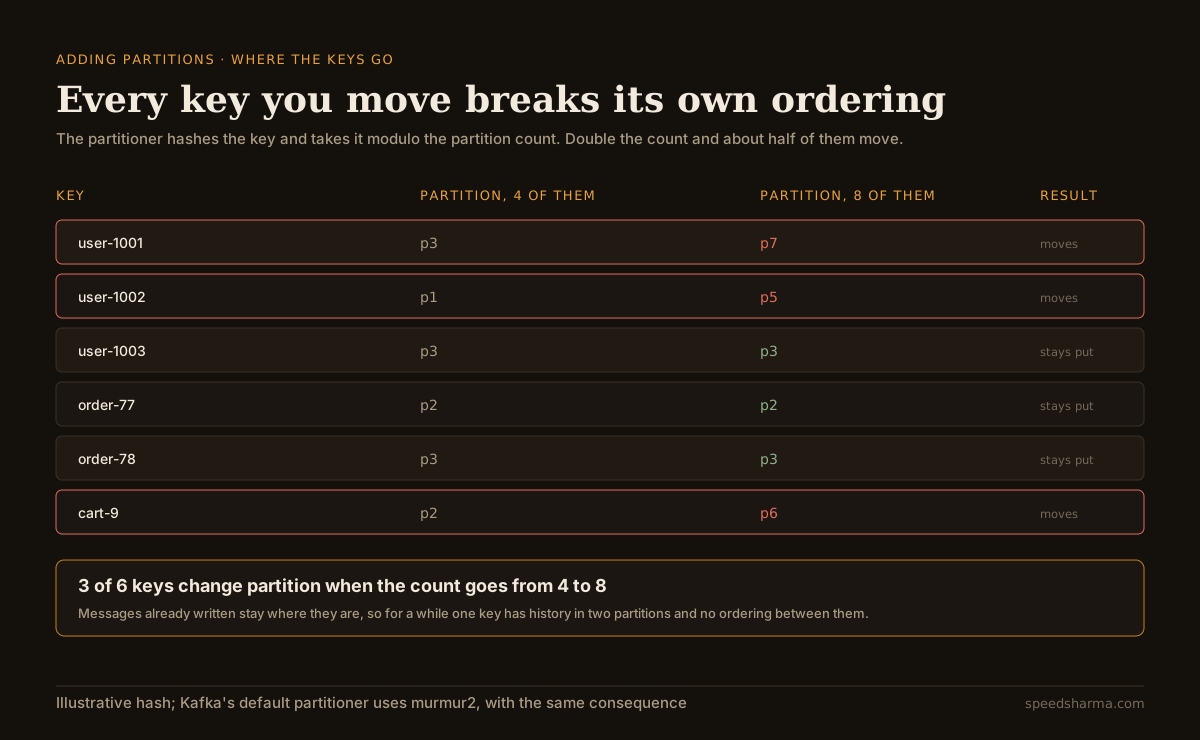
The proportion is not a detail of my example: doubling a partition count moves about half the keys, because a key stays put only when its hash lands in the lower half of the new range. Going from 4 partitions to 6 is worse still.
That is the real cost of getting it wrong downwards. Kafka's ordering guarantee is per partition: it "guarantees that any consumer of a given topic-partition will always read that partition's events in exactly the same order as they were written", and "events with the same event key are written to the same partition". Split a key's history across two partitions and that guarantee no longer says anything useful about that key.
If your events are keyed by customer, order or conversation, and your consumers care about sequence, treat repartitioning as a migration with a cutover, not as a scaling operation. Confluent's advice is to avoid the situation: "you can purposefully over partition, meaning you create partitions based on the future growth of your application instead of the current need".
What too many partitions cost
Over-partitioning has a limit too, and it is not just tidiness.
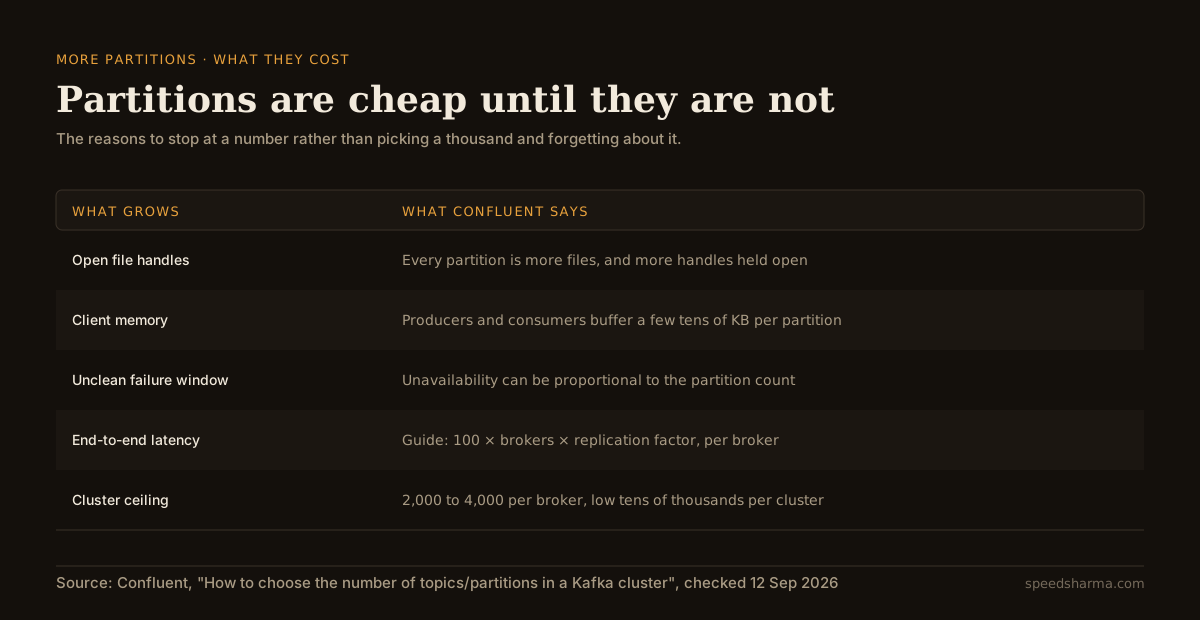
The figure that surprises people is availability. When a broker fails uncleanly, Confluent notes the unavailable window "could be proportional to the number of partitions" it was leading. A cluster deliberately over-partitioned for a growth that never came takes longer to recover from every hardware failure, forever.
The numbers worth remembering: limit partitions per broker to two to four thousand, keep the cluster in the low tens of thousands, and if latency matters, use 100 × brokers × replication factor per broker as the guide. Client memory matters too: producers and consumers buffer per partition, and Confluent suggests allowing "at least a few tens of KB per partition", which is how a client with 5,000 partitions quietly needs hundreds of megabytes.
quick check
Your topic must carry 60 MB/s. One partition takes 20 MB/s from producers, and one consumer instance manages 6 MB/s. What is the minimum partition count?
max(t/p, t/c) is max(60/20, 60/6), which is max(3, 10) = 10. The consumer side almost always decides, because a consumer does real work per message while a producer mostly writes bytes.
Too few against too many
| Too few partitions | Too many partitions |
|---|---|
| Extra consumer instances sit idle, because one partition has exactly one reader in a group | Brokers carry thousands of replicas, and every unclean failover takes longer |
| Throughput is capped no matter how many pods you run | More open file handles, and tens of KB of client memory per partition |
| Fixable by adding partitions, which re-maps keys and breaks per-key ordering | Not fixable at all: Kafka never reduces a topic's partition count |
| Shows up as consumer lag that never drains | Shows up as latency, rebalance time and slow recovery |
Both columns are bad, but only one of them has an escape hatch, which is why the sensible bias is to pick a number slightly larger than today's need and stop there. Doubling is defensible. Ten times is a bet on a future that will cost you failover time every week until it arrives.
How I would actually decide
- Decide the key first. Partitioning is a consequence of ordering requirements. What must stay in order relative to what? Customer? Conversation? Nothing at all? If nothing needs ordering, you have far more freedom and should use it.
- Measure c on real work. Run one consumer instance against a realistic backlog and record MB/s at a p99 payload, with the database and the downstream calls in place.
- Take max(t/p, t/c, consumer instances you want busy). Peak throughput, not average.
- Double it, once. That is your headroom against growth, and the reason you will not need to re-map keys next year.
- Round to a number that divides evenly by the consumer counts you expect to run.
- Check it against the broker. Partitions × replication ÷ brokers, against the per-broker guides.
- Watch lag per partition, not just per topic. A single hot key can pin one partition at 100% while the topic looks healthy, and it is the earliest signal that your key is wrong rather than your count.
Two related things are worth having in place before you need them. Consumers retry, and retries mean the same message is processed more than once, so consumer handlers want to be idempotent rather than merely careful. And when a consumer group does fall behind, the recovery has its own dynamics: a backlog that has to be drained by the same slow consumer that created it is the explosion pattern, and adding partitions mid-incident is the worst possible moment to re-map keys.
questions people ask
How many partitions should a Kafka topic have?
At least max(t/p, t/c), where t is target throughput and p and c are what one partition sustains for producers and consumers, and never fewer than the number of consumer instances you want working. Add headroom, because partitions cannot be removed later.
Can you reduce the number of partitions in Kafka?
No. The Apache Kafka documentation states that Kafka does not currently support reducing a topic's partition count. The only route down is a new topic and a migration.
What happens when you add partitions to a Kafka topic?
New messages are distributed over the larger set, but existing data stays where it is. Since keys are mapped by hash modulo partition count, most keys start landing in a different partition, which breaks per-key ordering across the change.
Does more partitions mean more throughput?
Up to a point. Partitions are the unit of parallelism, so more of them allow more concurrent producers and consumers, but they also add open file handles, client memory, replication latency and longer recovery after an unclean broker failure.
How many partitions can one broker handle?
Confluent suggests limiting a broker to 2,000 to 4,000 partitions and a cluster to low tens of thousands, with 100 × brokers × replication factor per broker as a stricter guide when latency matters.
Why are some of my consumers idle?
Because each partition is consumed by exactly one consumer within a group. If you run more consumer instances than partitions, the extras have nothing to read.
The short version
Take the largest of three numbers: target throughput divided by what one partition gives you on the producer side, the same on the consumer side, and the number of consumer instances you want busy. Measure the consumer number rather than guessing it. Double the result once for headroom and round it to something that divides evenly.
Then stop. Partitions cannot be removed, and adding them later re-maps your keys and breaks per-key ordering, so the number you choose is close to permanent. A topic that is slightly over-provisioned is a small tax; one that is under-provisioned is a migration, and one that is wildly over-provisioned is slower to recover every time a broker dies.