There is a moment in most Kubernetes migrations where somebody has to fill in four lines of YAML for a service they did not write, using numbers nobody has measured, on a deadline. They put 1000m and 1Gi in all four slots because it is a round number, the pod starts, and that is the last time anyone looks at it.
Those four lines are two completely different mechanisms wearing the same costume. One of them is the size of the cluster you rent. The other is a ceiling the kernel enforces whether or not anyone else wants the CPU. Getting them confused is expensive in one direction and slow in the other, and most fleets manage both at once.
What each number actually does
The Kubernetes documentation is unambiguous about the split, and it is worth reading the two sentences side by side rather than taking them from a blog post.
On requests: "When you specify the resource request for containers in a Pod, the kube-scheduler uses this information to decide which node to place the Pod on," and "The kubelet also reserves at least the request amount of that system resource specifically for that container to use."
On limits: "cpu limits are enforced by CPU throttling. When a container approaches its cpu limit, the kernel will restrict access to the CPU corresponding to the container's limit. Thus, a cpu limit is a hard limit the kernel enforces."
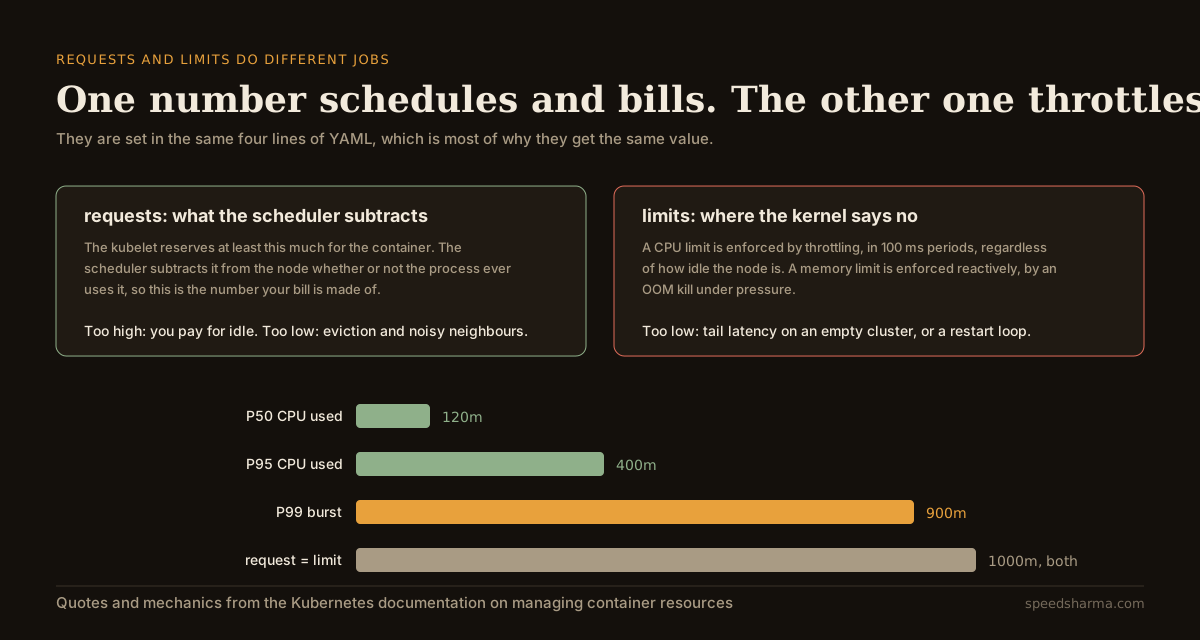
Memory behaves differently again, and the docs are careful about it: "memory limits are enforced by the kernel with out of memory (OOM) kills... terminations only happen when the kernel detects memory pressure. Thus, a container that over allocates memory may not be immediately killed." So a memory limit is a reactive, brutal mechanism, while a CPU limit is a proactive, continuous one. They are not two flavours of the same setting, and a single "sizing policy" that treats them alike will be wrong about one of them.
There is a third consequence people forget: "If you specify a limit for a resource, but do not specify any request... then Kubernetes copies the limit you specified and uses it as the requested value." A limit-only manifest silently sets your bill to the limit.
Why the default is always too big
Nobody sets 1000m because they measured 1,000 millicores. They set it because the alternative is to be the person whose service fell over, and a request that is too large is invisible while a request that is too small pages you at 3am. The incentive only points one way.
At scale that bias is measurable. Datadog's container report, drawn from billions of containers, found that "over 65 percent of Kubernetes workloads are utilizing less than half of their requested CPU and memory". The same report notes that "less than 1 percent of Kubernetes organizations use VPA — and this number has remained flat since we last looked at VPA adoption in 2021", while over half use the horizontal autoscaler. So the industry scales the number of pods aggressively and almost never revisits the size of one.
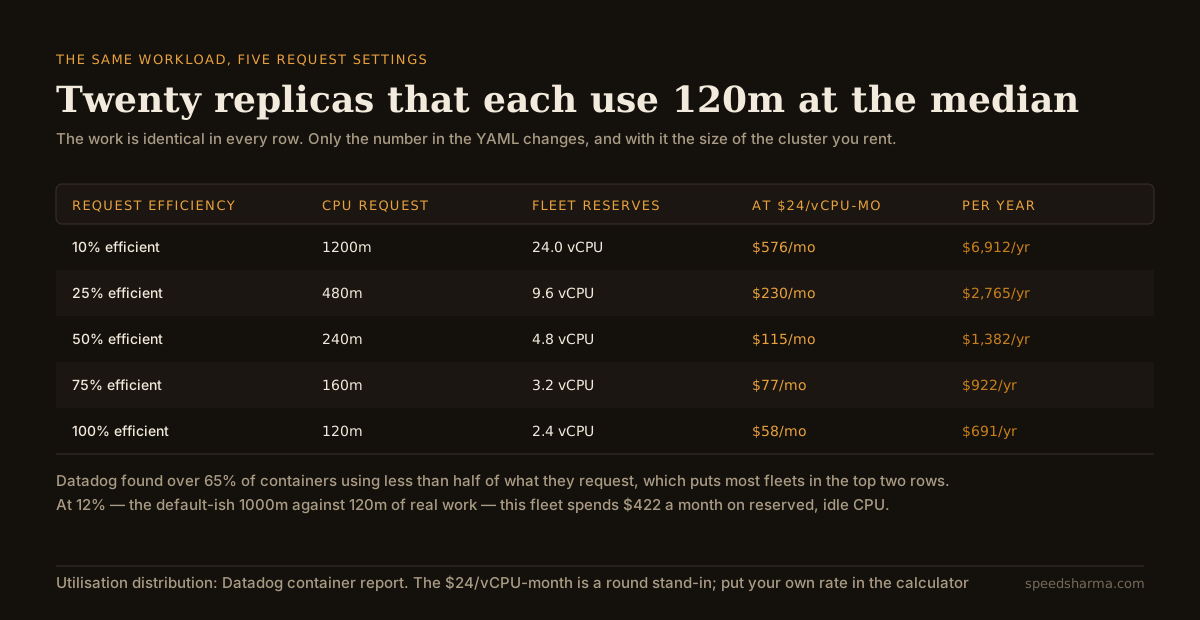
The arithmetic is unglamorous: twenty replicas requesting 1,000m hold 20 vCPU. At a round $24 per vCPU-month that is $480, of which about $422 is capacity nobody is running code on. Multiply by every service in the cluster and you have the cloud bill that nobody can explain, made entirely of numbers typed in a hurry.
If you run GKE Autopilot the link is direct rather than indirect: you are "charged in one-second increments for the CPU, memory, and ephemeral storage resources that your running Pods request". The request is not an input to your bill. It is your bill.
What does a CPU limit actually cost?
This is the part that surprises people, because it is invisible in every dashboard except the one nobody has open.
A CPU limit is implemented as a CFS quota: the container gets a slice of CPU time per 100 ms period. When a request arrives that needs more CPU than the slice, the container does not borrow from the idle node next door. It stops, and resumes in the next period. The node can be at 10% utilisation while your p99 climbs, and nothing in the cluster looks unhealthy.
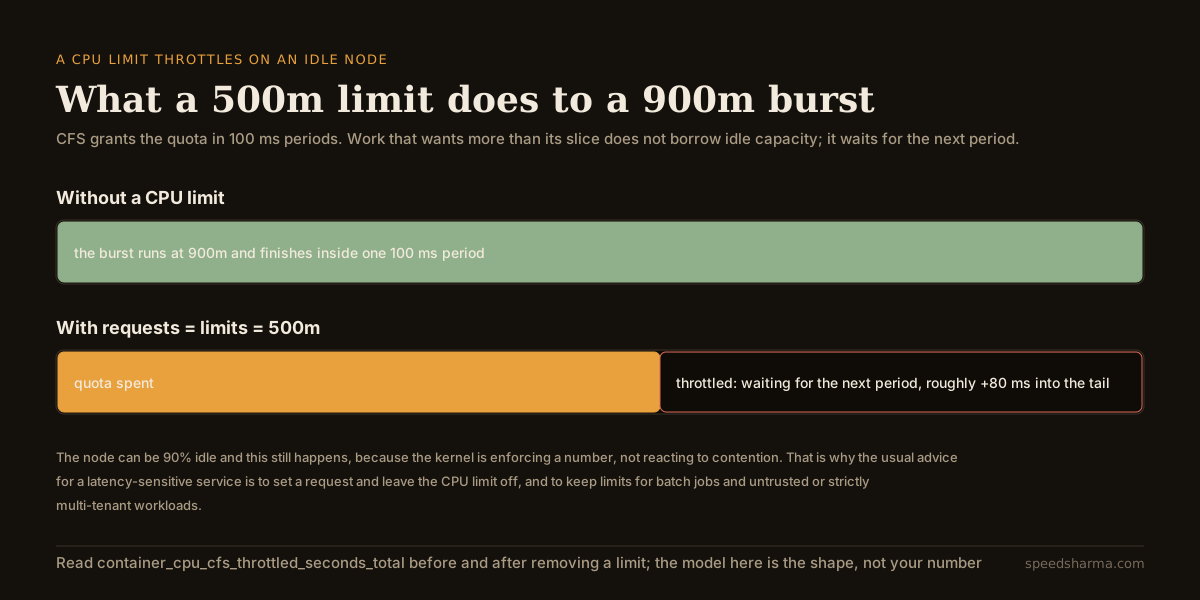
The cruel part is that this usually arrives as a fix. A team reads that its requests are too high, pulls both numbers down to something close to the median, and ships. Requests are now honest, the bill drops, and the p99 doubles, because the P99 burst that used to run at 900m now has a 500m ceiling. The cost saving is real and so is the regression, and because they shipped together nobody can tell which change caused what.
The defensible default for anything user-facing is a request sized from measured P95 and no CPU limit at all. Keep CPU limits for batch jobs, untrusted code, and hard multi-tenant isolation, where a predictable ceiling is worth more than a fast tail. Memory limits are a different argument: there, the limit is what stops one leaking container from taking the node down with it, and you generally do want one.
Put your own numbers in
The calculator does both halves: what your requests reserve and bill, and what your limit does to a burst. The defaults are the fleet above — twenty replicas that use 120m at the median with a 900m tail, requesting and limiting 1,000m.
Two experiments worth running. First, set the request to 500m and watch the monthly figure fall. Then set the limit to 500m as well, which is what "right-sizing" usually means in a ticket, and watch the throttle number appear. That gap between the two is the whole design problem.
calculator · pod right-sizing
What your requests reserve, and what your limit throttles
millicores: what the container uses, what you reserved, where the ceiling is
monthly cost of this fleet at different request efficiencies, same workload
The throttle figure models CFS as it is documented: quota is granted per 100 ms period, so a burst that wants more than its slice finishes in a later period. Real throttling depends on how bursty the work is inside each period and how many threads are competing, so treat it as the shape of the problem and read container_cpu_cfs_throttled_seconds_total for the real number. Cost uses on-demand compute at a flat price per vCPU-month and ignores the memory dimension, reservations and node packing, all of which move the answer.
The suggested request is P95 plus a quarter. That is a starting point, not a law: P95 plus 25% gives you headroom for the ordinary variation in a day without paying for the once-an-hour spike, and the spike is what burst capacity on an unthrottled container is for. Services with a genuinely spiky shape — a cron-triggered fan-out, a cache warm on deploy — need the request built from the spike instead, because the scheduler has to fit the pod on a node that can actually run it.
The 1.35 change that removes the excuse
The strongest argument for padding a request used to be procedural rather than technical: changing it meant recreating the pod, so the number had to be right for the next six months, so you rounded up.
In-place pod resize is stable as of Kubernetes v1.35, having first appeared in v1.27. CPU can be resized on a running container without a restart; memory typically still wants one. That turns request sizing from a deployment-shaped decision into something closer to a dial, and it is the reason the Vertical Pod Autoscaler is worth a second look if you dismissed it in 2022 for evicting your pods to change a number.
It does not make the number self-correcting. Something still has to decide what to set, from metrics somebody is collecting, and "under 1% adoption, flat since 2021" suggests that the missing piece was never the mechanism.
How to actually do this
The order matters, because two of these steps hide the effect of the others.
| Step | What you do | Why this order |
|---|---|---|
| 1 | Record P50, P95 and P99 CPU per container over two weeks | One week misses the weekly peak, which is usually the real P99 |
| 2 | Remove CPU limits from latency-sensitive services | Do this alone, so the latency change is attributable |
| 3 | Watch throttled periods go to zero and p99 fall | If p99 does not move, limits were not your problem |
| 4 | Set requests from P95 plus headroom | Now the measurements are of unthrottled work, which is what you want to size from |
| 5 | Re-check node packing and pod disruption budgets | Smaller requests mean more pods per node and a bigger blast radius per node |
| 6 | Keep memory limits, set from P99 plus a real margin | A memory limit is a blast-radius control, not a cost control |
Step 5 is the one that catches people. Halving requests across a cluster does not halve the bill on its own — it changes how many pods fit on a node, and the saving only arrives when the cluster autoscaler removes nodes. If your node pool has a floor, or your pods have anti-affinity rules that spread them thin, the reserved CPU goes down and the invoice does not. That is the same trap as pool sizing in Postgres, where the setting you tune and the resource you are trying to save are two hops apart.
quick check
Your service has no CPU limit, requests 1000m, and uses 120m at the median. A node is at 30% utilisation. What is the most likely problem?
With no CPU limit there is no throttling. The request is still subtracted from the node's allocatable CPU, so 880m per replica is reserved and unused. Low node utilisation is the symptom, not the cause — the node looks empty because the scheduler already gave the capacity away to pods that are not using it.
What the arithmetic cannot tell you
Three things, and they all matter more than the number the calculator prints.
Whether the workload is one shape or several. A P95 across a service that handles both a 2 ms health check and a 400 ms report is a number that describes neither. Sizing from a mixed distribution produces a request that is generous for the common case and insufficient for the rare one. Split the workload before you size it, or size it for the shape that actually matters.
What happens on the way up. Requests are a steady-state model. A deploy, a cache flush, or a restart after an incident all produce a period where every replica is working much harder than P95, and a fleet sized tightly to the median will be slowest exactly when it is being watched. This is the same failure the tail latency of a fan-out exposes: the average is fine and the experience is not.
Whether the saving is worth the attention. A fleet burning $422 a month in reserved idle CPU is a real number and a small one. If right-sizing forty services takes an engineer a fortnight, the payback is slower than it looks in the spreadsheet. The case for doing it is usually not the invoice but the throttling you find on the way, which has been quietly costing you latency the whole time. That is also the argument for treating this as capacity arithmetic rather than a cost programme.
questions people ask
Should I set CPU limits in Kubernetes?
For latency-sensitive services, generally not. A CPU limit throttles in 100 ms periods regardless of how idle the node is, so it adds tail latency without protecting anyone when there is spare capacity. Set a request, which is what the scheduler uses, and keep CPU limits for batch jobs, untrusted workloads and strict multi-tenant isolation. Memory limits are a separate question: keep those, because they bound the blast radius of a leak.
What should my CPU request be?
Measured P95 usage plus roughly 25%, over a window long enough to include your weekly peak. Measure it with CPU limits removed, because usage measured under throttling is a measurement of the limit rather than of the work.
Does lowering requests actually lower my cloud bill?
Only when something shrinks the cluster. On GKE Autopilot billing follows requests directly, so the saving is immediate. On a node-based cluster the saving arrives when the cluster autoscaler removes nodes, which node-pool minimums, anti-affinity and disruption budgets can all prevent.
How do I know if my pods are being throttled?
Compare container_cpu_cfs_throttled_periods_total against container_cpu_cfs_periods_total per container. Any sustained ratio above a few percent is showing up in your tail latency, and it will not appear as high CPU utilisation on the node.
Is the Vertical Pod Autoscaler safe to use now?
It is more usable than it was. In-place pod resize is stable in Kubernetes v1.35, so CPU can change on a running container without the restart that made VPA disruptive. Adoption remains under 1% of organisations, so run it in recommendation mode first and look at what it suggests before letting it act.
What about memory requests?
Size memory requests from P99 rather than P95, and set the limit with a real margin above that. Memory has no equivalent of bursting into idle capacity: exceeding the limit under pressure means an OOM kill, and the failure is a restart rather than a slow request.
The short version
Requests and limits are not two settings for the same thing. The request is the size of the cluster you rent and, on Autopilot, the invoice itself. The limit is a ceiling the kernel enforces in 100 ms slices whether or not anyone else wants the CPU.
Most fleets get both wrong in a way that compounds: requests too high, so the bill is made of reserved idle capacity, and limits set to the same number, so the tail gets throttled the moment anyone tries to fix the first problem. Measure P95 with limits off, size the request from that, leave CPU limits off for anything user-facing, and keep memory limits because they do a different job.
The number to check first is not your utilisation graph. It is throttled periods, because that one has been costing you latency without ever appearing as a cost.