A dependency goes down for ten seconds. Every client that had a request in flight fails at the same instant, and every one of them starts counting. They are all running the same library, with the same one-second first delay and the same doubling. So they all come back at one second, and again at three, and again at seven. The dependency recovers, and a thousand requests arrive in the same second at a server that can serve a hundred.
Ninety per cent of them are turned away. Those nine hundred wait out a longer backoff and arrive together again. The outage lasted ten seconds; the recovery takes four and a half minutes, and every second of it looks like an attack.
This is the thundering herd, and the fix is one line of code: make each client wait a random amount of time instead of the same amount. I run PostEngage on my own, where every external call is a job with an explicit retry, dead-lettering and an alert, so I have had to pick these numbers deliberately rather than accept a library default. The numbers below come from a simulation you can run yourself further down the page.
Why backoff on its own does not fix it
Exponential backoff solves the wrong half of the problem. It reduces how often one client asks, which is what you want when the failure is that one client is being too eager. It does nothing about when a fleet of clients asks, and an outage is an event that starts every client's timer at the same moment.
Marc Brooker put this plainly in the AWS Architecture Blog post Exponential Backoff And Jitter, which is the source most later guidance traces back to. Watching a simulation of plain capped exponential backoff, he writes: "There are still clusters of calls. Instead of reducing the number of clients competing in every round, we've just introduced times when no client is competing."
The Amazon Builders' Library entry Timeouts, retries, and backoff with jitter makes the same point about the cap specifically: capping the delay stops the waits growing without bound, but "now all of the clients are retrying constantly at the capped rate". The clients are still in lockstep; you have just chosen the tempo.
The same document is worth reading for its framing of retries in general: "Retries are 'selfish.' In other words, when a client retries, it spends more of the server's time to get a higher chance of success." When failures are rare that trade is fine. When the failure is overload, "retries that increase load can make matters significantly worse. They can even delay recovery by keeping the load high long after the original issue is resolved."
The four schedules
There are four schedules worth knowing, and the AWS post gives all of them as one-liners. base is the first delay, cap is the longest delay you will allow, and attempt counts from zero.
no jitter     sleep = min(cap, base * 2 ** attempt)
full jitter   sleep = random(0, min(cap, base * 2 ** attempt))
equal jitter  sleep = min(cap, base * 2 ** attempt) / 2
                    + random(0, min(cap, base * 2 ** attempt) / 2)
decorrelated  sleep = min(cap, random(base, sleep * 3))
Full jitter throws away the schedule and picks any point in the window, so a client can retry almost immediately or wait the whole window. Equal jitter keeps half the wait fixed and randomises the other half, which guarantees a minimum gap. Decorrelated jitter ignores the attempt counter altogether and grows from the client's own last sleep, which makes it wander rather than march.
| Schedule | Wait after the 4th failure, base 1 s, cap 30 s | Where you meet it |
|---|---|---|
| No jitter | exactly 16 s | most hand-rolled retry loops |
| Full jitter | 0 to 16 s, uniform | the AWS SDKs' standard retry mode |
| Equal jitter | 8 to 16 s | common in client libraries that want a floor |
| Decorrelated | 1 s to 3x the last wait, capped | the AWS post's own recommendation for work |
The libraries you already run have picked sides. The AWS SDK retry reference describes standard mode as "exponential backoff with full jitter", computed as delay = random(0, 1) × min(20,000 ms, base_delay × 2^retry), with a base of 50 ms for transient errors and 1,000 ms for throttling errors, three attempts by default and a 20-second ceiling. That page documents the updated behaviour that is opt-in during 2026 through AWS_NEW_RETRIES_2026, so check which one your version is running.
gRPC's connection backoff spec takes the narrower approach: INITIAL_BACKOFF of 1 second, MULTIPLIER of 1.6, MAX_BACKOFF of 120 seconds, and JITTER of 0.2, applied as UniformRandom(-JITTER * current_backoff, JITTER * current_backoff). That is plus or minus twenty per cent, which is enough to break up a herd of reconnecting clients without much changing when any one of them returns.
The Socket.io client, which is the reconnection loop I have spent the most time with, defaults to a reconnectionDelay of 1,000 ms, a reconnectionDelayMax of 5,000 ms, a randomizationFactor of 0.5 and unlimited attempts. At TRIBE live prices went out over Socket.io on Redis pub/sub, and the thing to understand about that setup is that every ordinary deploy disconnects every connected client at once. The reconnection defaults are not an edge case; they are what happens on every release.
A thousand clients and a ten-second outage
Here is the simulation the rest of this post rests on. A thousand clients all fail at second zero. The server is down for ten seconds; after that it serves up to a hundred requests a second and rejects the rest. Clients retry until they get through, with a first delay of one second and a cap of thirty.
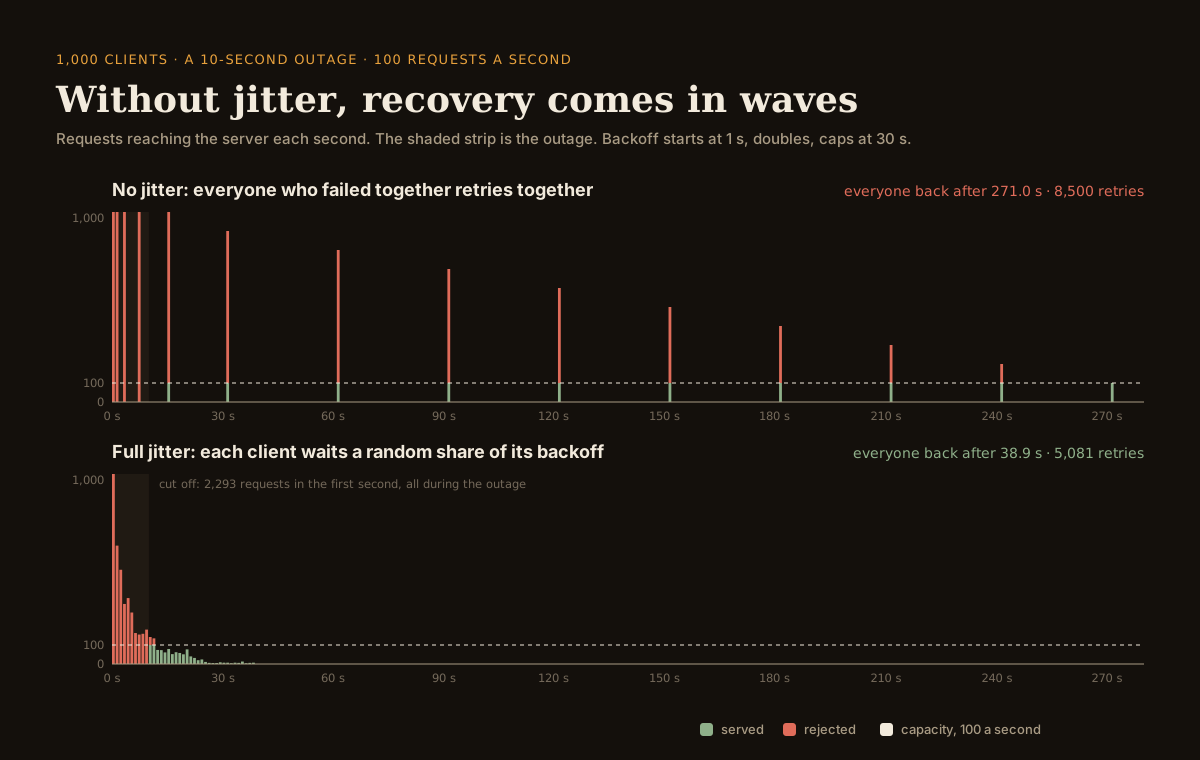
The no-jitter arithmetic is worth doing by hand, because it explains the shape. Attempts land at 0, 1, 3, 7 and 15 seconds, then every 30 seconds once the cap bites: 31, 61, 91 and so on. The outage ends at ten seconds, so the wave at fifteen seconds is the first that can succeed. A thousand requests arrive in that one second, a hundred are served, and nine hundred are rejected. Those nine hundred wait thirty seconds and arrive together at 31 seconds, where a hundred more get through. Ten waves later, at 271 seconds, the last client is back.
Nothing was overloaded in any meaningful sense. A thousand clients against a hundred requests a second is ten seconds of work. Spread evenly, everyone would have been back twenty seconds after the outage began. Instead the fleet spent 8,500 retries and four and a half minutes, and 4,500 of those retries were rejected on arrival.
Full jitter changes one thing and the shape collapses into a hump that hugs the capacity line. The worst second after the outage carries 142 requests instead of 1,000, only 77 requests are turned away in total, and the last client is back at 38.9 seconds.
simulator · clients retrying after an outage
What happens when everyone retries at once
requests reaching the server each second
| schedule | retries | worst second after | everyone back |
|---|
Every client fails at second zero and keeps retrying until it gets through. While the outage lasts every request fails; after it, the server serves up to its capacity in each second and rejects the rest, which is kinder to the herd than a real server that slows down under a burst. Backoff is capped exponential, with jitter as defined in the AWS Architecture Blog post linked below. The random numbers are seeded, so the same inputs give the same answer.
Which jitter should you pick
Run the simulator through all four and the ranking is less dramatic than the gap between jitter and no jitter.
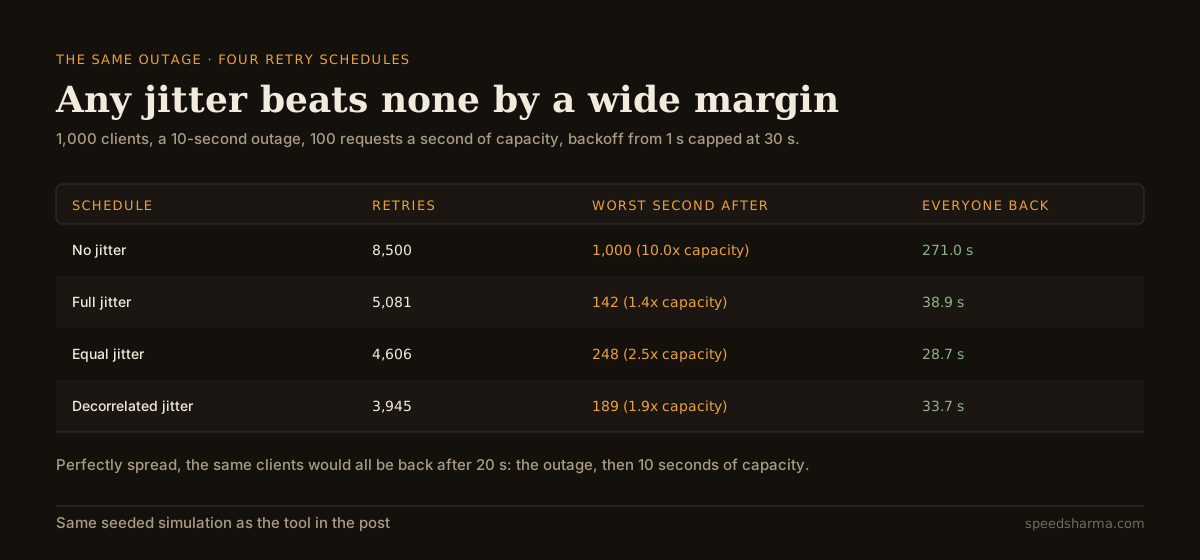
Decorrelated jitter does the least work: 3,945 retries against 5,081 for full jitter, because it does not reset to a small delay each time the attempt counter is low. Full jitter is gentlest on the server in the moment, with the lowest post-outage peak and only 77 rejected requests, because it is the only schedule that lets a client retry almost immediately and so keeps trickling arrivals in. Equal jitter recovers soonest here, at 28.7 seconds, because its guaranteed minimum wait stops clients wasting attempts during the outage.
That last result differs from the AWS post, which concluded that "of the jittered approaches, 'Equal Jitter' is the loser. It does slightly more work than 'Full Jitter', and takes much longer." The difference is the workload, not a contradiction. That simulation modelled clients contending with each other over a shared database, where the thing you are waiting out is other clients. This one models an outage followed by a hard capacity limit, where the thing you are waiting out is the clock. Both are real failures, and they reward slightly different schedules.
Which is the practical conclusion: do not spend a week choosing between full, equal and decorrelated jitter. Spend an hour making sure you have any of them. As the AWS post puts it: "The return on implementation complexity of using jittered backoff is huge, and it should be considered a standard approach for remote clients."
quick check
A ten-second outage ends. A thousand clients are waiting, all with the same capped exponential backoff and no jitter, against a server that handles a hundred requests a second. When is the last client back?
Each wave brings every waiting client at once, a hundred get through, and the rest wait out another capped delay of thirty seconds. Ten waves puts the last client back at 271 seconds, against 20 seconds if the same load had been spread evenly.
Retries multiply through the stack
A single client's retry policy is not the whole story, because a request usually passes through several services that each have one.
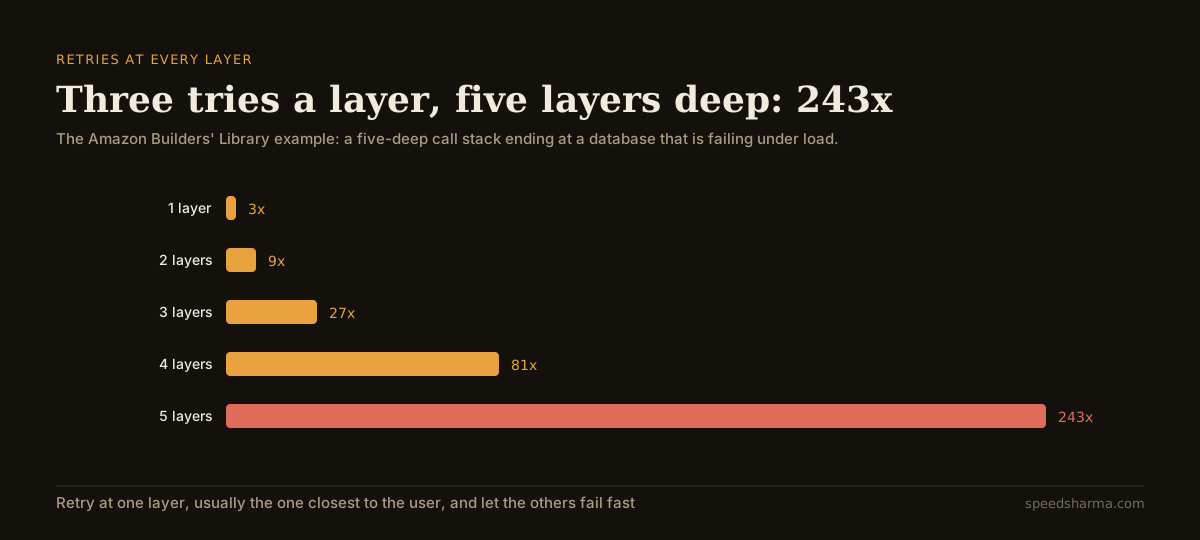
The Builders' Library gives the canonical example: a five-deep stack of service calls ending at a database, with three tries at each layer. "If each layer retries independently, the load on the database will increase 243x, making it unlikely to ever recover." Google's SRE book reaches the same conclusion in Addressing Cascading Failures with a shorter stack: if the backend, frontend and JavaScript layers each issue three retries, "a single user action may create 64 attempts (4^3) on the database".
The remedy in both books is the same, and it is an architectural decision rather than a tuning one: "our best practice is to retry at a single point in the stack". Pick the layer that knows enough to decide whether a retry is worth it, usually the one nearest the user, and have everything below it fail fast and report upwards. A middle layer that quietly retries three times is also a middle layer that turns your carefully chosen five-second timeout into fifteen seconds of a held connection.
Budgets beat counts
Backoff and jitter shape retry traffic. They do not bound it. If a dependency is properly down, a well-jittered fleet will still politely hammer it forever, which is why the better libraries pair jitter with a budget.
The AWS SDKs implement this as a token bucket the same page documents: a budget of 500 tokens, 14 tokens deducted per transient retry and 5 per throttling retry, with tokens restored on success. When the budget hits zero the SDK stops retrying and returns the error immediately. Their own figure for when it starts to bite is roughly 22 per cent sustained transient failures, or 32 per cent for throttling. Below that, successes refill the budget faster than retries drain it, and the quota has no effect at all.
Google's SRE book suggests the same shape with a simpler number: "consider having a server-wide retry budget. For example, only allow 60 retries per minute in a process, and if the retry budget is exceeded, don't retry; just fail the request." Brooker's later write-up on token buckets and circuit breakers describes the ratio version, where "each success could deposit 0.1 tokens, and each retry could consume 1 token", which caps retries at roughly ten per cent of successful traffic no matter how large the fleet grows.
The Builders' Library prefers this to the more familiar circuit breaker, and the reason is honest: circuit breakers "introduce modal behavior into systems that can be difficult to test, and can introduce significant addition time to recovery". A budget degrades smoothly. A breaker flips.
What I would actually set
For a client calling a service you do not own:
- Full jitter, a base near the service's normal latency, and a cap you can defend. 100 ms and 20 seconds are reasonable if you have nothing better. The AWS SDK's 50 ms transient and 1,000 ms throttling bases are a good model: back off harder when the server has explicitly told you it is rate limiting.
- Two or three attempts, not five. The client is usually going to give up on its own timeout anyway.
- A retry budget per process. Ten per cent of successful traffic, or a flat 60 a minute, whichever you can implement this week.
- Retries at one layer only. Turn them off everywhere else and say so in the code.
- A metric for retries as a share of requests. It is the earliest signal that a dependency is sick, and it is the number that tells you whether a budget would have fired.
In Node, the schedule is about eight lines:
const fullJitter = (attempt: number, base = 100, cap = 20_000) =>
  Math.random() * Math.min(cap, base * 2 ** attempt)

async function withRetry<T>(call: () => Promise<T>, budget: Budget, attempts = 3) {
  for (let attempt = 0; ; attempt++) {
    try {
      return await call()
    } catch (err) {
      if (attempt >= attempts - 1 || !isRetryable(err) || !budget.take()) throw err
      await sleep(fullJitter(attempt))
    }
  }
}
If the work is already going through a queue, the queue usually has this built in and turned off. BullMQ's retry documentation gives exponential backoff as 2 ^ (attempts - 1) * delay and a jitter option between 0 and 1 that defaults to 0, meaning no randomisation unless you ask:
await queue.add('send-webhook', payload, {
  attempts: 8,
  backoff: { type: 'exponential', delay: 3000, jitter: 0.5 },
})
Moving slow work into a queue is the other half of this problem, and it brings its own failure mode: a queue absorbing a herd is a queue that can fill faster than it drains if nothing pushes back on the producer.
One last habit, from the Builders' Library and worth more than it sounds: jitter your scheduled work too. "When building systems, we consider adding some jitter to all timers, periodic jobs, and other delayed work." Every cron job on the hour, every daily report at midnight and every cache refresh on a round interval is a herd you scheduled yourself. Their refinement is neat: do not randomise per host on every run, but "use a consistent method that produces the same number every time on the same host", so an overload reproduces in a pattern you can recognise instead of at random.
Retries are also a line in your availability arithmetic rather than a fix for it. A dependency that fails ten per cent of the time is still a dependency that fails, and the composite SLA of your request path is what decides how much of that you can absorb.
questions people ask
What is jitter in exponential backoff?
A random component added to the wait between retries, so that clients which failed at the same moment do not retry at the same moment. Backoff spreads one client's attempts over time; jitter spreads a fleet's attempts over each other.
What is the difference between full jitter and equal jitter?
Full jitter picks a random wait anywhere between zero and the current backoff window. Equal jitter keeps half of the window as a fixed minimum and randomises the other half. Full jitter spreads traffic more evenly; equal jitter guarantees a client waits at least half the window.
Does adding jitter slow down recovery?
It slows down the fastest individual client and speeds up the fleet. In the simulation in this post, a thousand clients clear a ten-second outage in 271 seconds with no jitter and 29 to 39 seconds with jitter, because without it almost every retry is rejected on arrival.
How many retries should a client make?
Two or three attempts for most calls, paired with a budget that caps retries across the whole process. The AWS SDKs default to three attempts with a 500-token retry quota; Google's SRE book suggests a limit such as 60 retries a minute per process.
Should I add jitter to cron jobs and scheduled work?
Yes. Anything scheduled on a round number is a synchronised herd by construction. Amazon's guidance is to jitter timers and periodic jobs as well as retries, using a value that stays consistent per host so that overload patterns remain recognisable.
What backoff does the AWS SDK use by default?
Standard mode uses exponential backoff with full jitter: a random fraction of min(20 seconds, base × 2^retry), with a 50 ms base for transient errors and a 1,000 ms base for throttling errors, three attempts, and a token-bucket retry quota.
The short version
Backoff decides how often one client asks. Jitter decides whether a thousand clients ask at the same instant, and an outage is precisely the event that synchronises them. Without jitter, a capped schedule keeps the fleet marching in step: each wave delivers far more load than the server can take, almost all of it is rejected, and the recovery lasts many times longer than the outage did.
Pick full jitter unless you have a reason not to, keep attempts low, add a retry budget so a sick dependency cannot be hammered indefinitely, and retry at exactly one layer of your stack. Then go and jitter your cron jobs, because the herd you schedule yourself is the one nobody thinks to look for.